One ledger for up to 10 rentals
Choose a property for each actual receipt or payment. Keep income, repairs, insurance, and other supported expenses together instead of maintaining a separate workbook for each rental.
For landlords with 2–10 rentals
See the cash. See the rent still owed.
Keep up to 10 rentals in one Excel workbook. Record actual income and expenses, match rent payments to their months, and review each property’s cash flow without maintaining a stack of separate files.
Actual Pro Demo. Cash totals use reporting year 2026 through October 28; unpaid rent includes confirmed due periods from all years.
Secure checkout & file delivery by Creem
Applicable taxes and final total are shown at checkout.
YOUR WORK, CONNECTED
Rent due and cash received tell different stories. Keep both clear, from one property to the whole portfolio.
Choose a property for each actual receipt or payment. Keep income, repairs, insurance, and other supported expenses together instead of maintaining a separate workbook for each rental.
Review each property’s annual income, operating expenses, and cash flow. Choose a property or the whole portfolio for the monthly view. Interest and principal are shown separately.
Lease dates and monthly rent generate the normal monthly charges. Link each actual receipt to a lease and rent month to see what has been collected and what is still unpaid.
Record two or more receipts against the same rent month. The balance updates as payments arrive. A payment covering several months is split into rows that total the actual receipt.
Keep previous lease terms when tenants change. Check active leases ending within your chosen warning window, while retaining unpaid balances from expired leases.
Enter the agreed charge for a partial first or last month, or a one-month reduction. Add a new effective-month rate for a future increase instead of overwriting the original rent.
FROM FIRST ENTRY TO A CLEARER VIEW
Name the property slots, then enter each tenant’s lease dates, original monthly rent, and due day. Normal full-month rent generates automatically.
Enter receipts and payments in Transactions. For rent, match the Lease ID and the first day of its rent month, even when the payment arrived later.
Fix flagged inputs, choose the reporting year and as-of date, then review the Dashboard and filter Rent Schedule to investigate unpaid periods.
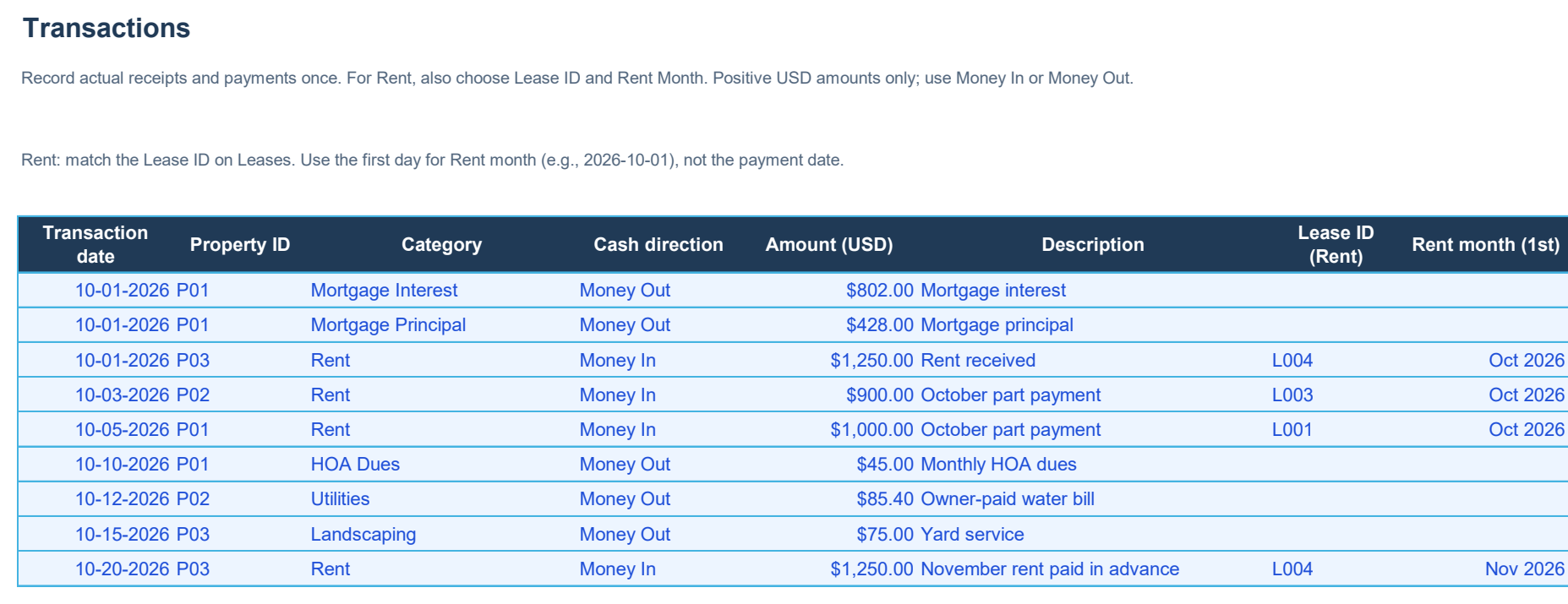
Example: $1,200 due, $600 received. One $600 rent receipt increases cash income by $600 and leaves $600 unpaid for that lease and month. A later receipt linked to the same period reduces the remaining balance.
ONE PURCHASE. YOUR OWN FILES.
Creem provides ZIP download access after successful payment and sends your receipt email.
Use the prepared input areas for your own records.
Pro Blank.xlsxExplore fictional records and see how the workbook works.
Pro Demo.xlsxAn English guide to setup, limits, and the checks to review.
Quick Start Guide.pdfBEFORE YOU BUY
Review the working environment and prepared limits. This is a workbook you operate yourself.
Ask a compatibility questionDesigned for desktop Excel 2019+ or Microsoft 365 with MINIFS and Automatic calculation. Verified on Windows Excel 16.0, build 20430. Excel 2019 itself, Mac, web, mobile, and other spreadsheet apps were not independently verified. Microsoft Excel is not included.
All amounts are USD. Each of the 10 property slots represents one independently leased unit.
Prepared capacity: 100 retained lease terms, 60 calendar months per lease, 300 rate/override rows, 5,000 cash entries, and 6,000 rent periods.
Enter a specific agreed charge for a partial first or final month. Add an effective-month rate for a future rent change. Editing original historical inputs can recalculate prior charges, including paid months; save backups.
No rent collection, bank sync, automatic duplicate removal, tax returns, deposit application to rent, or automatic transfer of overpayments between months. Review flagged entries before relying on totals.
Keep backups and review flagged entries. The license covers your own records or business; resale or redistribution is not permitted. Terms of Service · Refund Policy · Privacy Policy.
Pro is designed for desktop Microsoft Excel 2019 or later, including Microsoft 365, with Automatic calculation. It requires MINIFS and was verified on Windows Excel 16.0, build 20430. Excel 2019 itself, Mac, web, mobile, Google Sheets, and LibreOffice were not independently verified. Microsoft Excel is separate software and is not included.
No. The price is $14.90 USD once for the current download: Pro Blank.xlsx, Pro Demo.xlsx, and Quick Start Guide.pdf. Applicable taxes and the final total are shown at checkout. There is no recurring workbook subscription. Creem handles payment, the receipt email, and ZIP download access after successful payment.
Each of the 10 property slots is one independently leased rental unit. Use separate slots for separately leased units. Overlapping tenants in one slot, shared-room accounting, and multiple currencies are outside this workbook’s model. All amounts are in USD.
No for normal full months: lease dates and the monthly rent generate the schedule. You must enter an agreed amount for a partial first or final month; Pro does not guess proration. One-month overrides and effective-month rate changes handle agreed exceptions. Editing original historical inputs can still recalculate past charges, so keep backups.
No. Cash flow uses the actual receipt or payment date. Rent balances use the lease and rent month you assign, through the Dashboard’s as-of date. Refundable deposits stay outside income and cash flow. Overpayments do not automatically settle other months, and deposit application to rent is not modeled.
Up to 10 properties, 100 retained lease terms, 60 calendar months per lease, 300 combined rate changes and monthly overrides, 5,000 cash entries, and 6,000 generated rent periods. Use the prepared input rows; do not insert or delete rows, overwrite formulas, or sort fixed-ID tables. Duplicate valid transactions count twice.
No. You enter and reconcile transactions yourself. These are standard XLSX files without VBA or external data connections. Pro does not collect rent, send tenant reminders, connect to a bank, or produce tax returns. Cash flow is not taxable income, a legal determination of arrears, or a bank balance.
Yes. The license covers your own rental records or rental business, including working copies shared with your bookkeeper for those records. Reselling or redistributing the template is not permitted. See the Terms of Service and Refund Policy before purchasing.
RENTAL PROPERTY PORTFOLIO TRACKER — PRO
One ZIP with a clean workbook for your own records, a Demo with fictional transactions, and an English PDF Quick Start Guide.