Estimate from your own costs
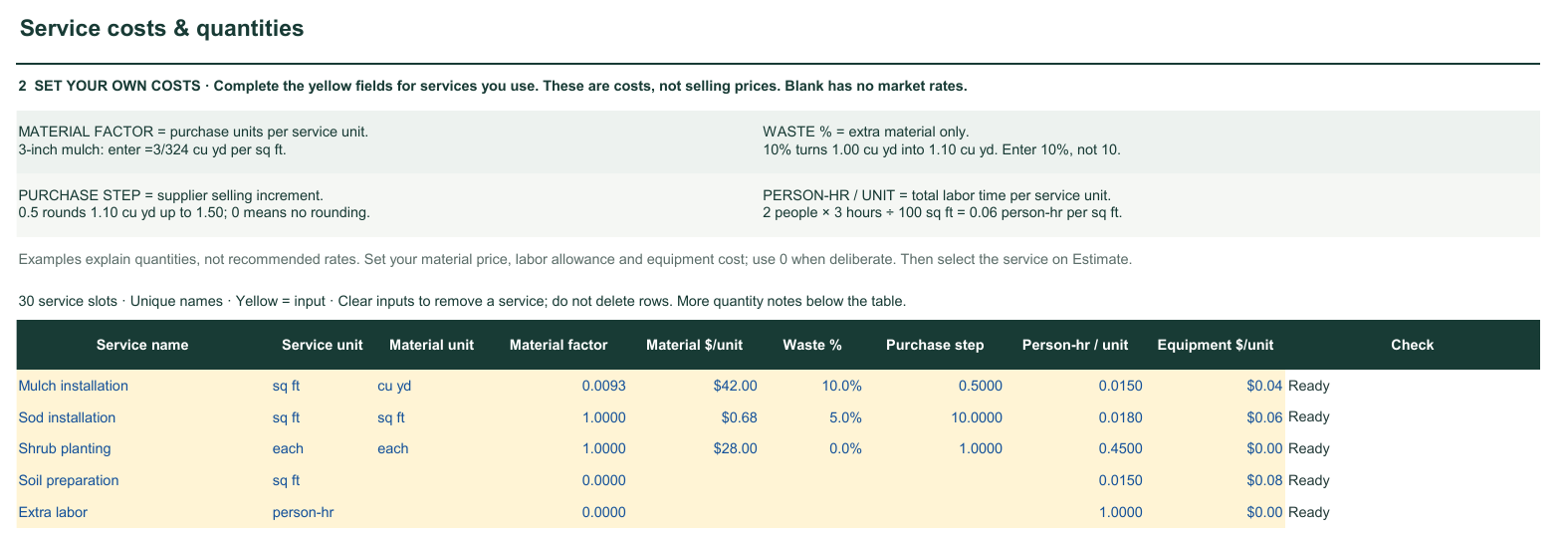
Define service costs for labor, materials and equipment. Select services and quantities in Estimate, and add transport, disposal or subcontract costs where needed. Blank contains no built-in market rates.
For small landscaping contractors
Quote the job. Track the costs. Know the profit.
Use this landscaping estimate template for one-off yard, planting, sod, mulch and cleanup jobs. Build an Excel estimate from your own costs, export a customer quote, then compare actual job costs and profit with the accepted budget. Save a separate workbook for each project.
Real Job worksheet with fictional Demo figures. The accepted amount, date and two budget values are saved manually.
Secure checkout & file delivery by Creem
Applicable taxes and final total are shown at checkout.
YOUR WORK, CONNECTED
For small landscaping contractors who need an Excel estimate, a customer quote and a clear job-cost review in one workbook.
Define service costs for labor, materials and equipment. Select services and quantities in Estimate, and add transport, disposal or subcontract costs where needed. Blank contains no built-in market rates.
Include material waste, purchasing increments and loaded person-hours. Choose overhead per person-hour or a fixed job amount, then set a target profit margin; equivalent markup is shown for reference.
Review the itemized Quote worksheet and export only that sheet to PDF. Keep internal cost calculations in your own workbook instead of sending the full XLSX to your customer.
After approval, enter the tax-exclusive accepted amount and date, then paste the direct-cost and overhead budgets as values. This manual baseline gives you a fixed comparison for the job.
Enter incurred costs and supplier credits in Actuals. Review cost variance and job profit against the saved contract budget. Customer payments and cash collected are outside this workbook.
Keep your service cost setup in a master copy of Blank.xlsx. Duplicate it for each project, or explore the fictional Demo and illustrated five-page guide before entering your own figures.
FROM FIRST ENTRY TO A CLEARER VIEW
Enter company and project details on Job. On Rates, replace the yellow inputs with your own materials, labor assumptions and equipment costs.
Choose services and quantities in Estimate. Review one-time costs, overhead and target margin before relying on the calculated price.
Check scope, quantities and the customer sales-tax amount you entered, then export only Quote. Keep the internal workbook private.
Enter the accepted tax-exclusive amount and approval date on Job. Copy the two indicated budgets and use Paste Values, then save the accepted PDF and workbook.
Enter incurred costs and supplier credits in Actuals. When the job is complete, review direct costs, overhead, variance and final profit on Job.
ONE PURCHASE. YOUR OWN FILES.
Creem provides ZIP download access after successful payment and sends your receipt email.
Use the prepared input areas for your own records.
Blank.xlsxExplore fictional records and see how the workbook works.
Demo.xlsxAn English guide to setup, limits, and the checks to review.
Quick Start.pdfBEFORE YOU BUY
Review the working environment and prepared limits. This is a workbook you operate yourself.
Ask a compatibility questionTested on Microsoft 365 desktop Excel for Windows, O365ProPlusRetail 16.0.20430.20178. XLSX without VBA or external data connections. Other versions/platforms have not been individually verified. Microsoft Excel is not included.
One workbook per landscaping project; save a separate copy for each job.
Prepared rows: 30 service recipes, 20 service lines, 8 one-time costs and 200 actual-cost records. Clear inputs instead of inserting/deleting structure rows.
One primary material and one blended labor rate per service. Purchases round per estimate line; supplier orders are not automatically combined.
Use target margin pricing; equivalent markup is not another charge. Overhead is either per person-hour or fixed per job, not both. Blank contains no built-in market rates.
Manually confirm and enter customer sales tax; it is excluded from revenue/profit. Nonrecoverable purchase tax belongs in costs. No US-wide tax rule is assumed.
Accepted amount, date and two budgets are manually saved as fixed values. Keep accepted PDFs/workbooks and backups; there is no immutable audit log.
Actuals records incurred costs and supplier credits, not customer payments. No accounting, invoicing, receivables, payroll, scheduling, legal contracts or tax filing. Profit is not cash collected or taxable income.
Native verification only on Microsoft 365 desktop Excel for Windows 16.0.20430.20178. Excel 2021/2024, Mac, browser Excel and other apps were not individually verified. Microsoft Excel is not included.
Keep backups and review flagged entries. The license covers your own records or business; resale or redistribution is not permitted. Terms of Service · Refund Policy · Privacy Policy.
No. Pay $19.00 USD once for Blank.xlsx, Demo.xlsx and Quick Start.pdf. Applicable taxes and the final total are shown at checkout. There is no recurring workbook subscription.
No. The workbook uses standard Excel formulas and input validation, without VBA macros.
Yes. Save your business's master file, then make a separate copy for each new landscaping job. Each workbook tracks one job.
Yes. Review the Quote worksheet and export only that sheet to PDF. Do not share the full internal workbook with customers.
Yes. Define your own service units, material costs, labor assumptions, equipment costs and overhead allocations.
No. Tax treatment varies by jurisdiction and service. You enter a customer sales-tax amount based on your own determination; tax is excluded from job profit.
No. To preserve a fixed historical budget, enter the approved price/date and paste two budget values as numbers using Excel's Paste Values command. The included guide shows the steps.
The workbook was tested with Microsoft 365 Excel on Windows desktop. Other platforms and Excel versions were not individually validated, so identical behavior is not guaranteed.
Blank.xlsx, Demo.xlsx and a five-page Quick Start.pdf guide.
No. Actuals records incurred job costs and supplier credits. It does not issue invoices, collect customer payments, track receivables, schedule crews or prepare tax returns. Job profit is not cash collected or taxable income.
LANDSCAPING ESTIMATE & JOB PROFIT TRACKER
One ZIP with Blank.xlsx, Demo.xlsx and a five-page illustrated English Quick Start.pdf. Unzip first and begin with Blank.xlsx.