Keep one record per numbered asset
Maintain unique equipment, customer and booking IDs for individually numbered assets.
For small equipment and tool rental businesses
Know what is available. Track what is owed.
Manage individually numbered tools and equipment rented by the calendar day. Check date-range availability, review booking conflicts and overdue returns, then keep rental receipts, refundable deposits and unpaid balances clear in Excel. Each booking covers one physical asset.
Review completed revenue separately from deposit cash. Fictional Demo data.
Secure checkout & file delivery by Creem
Applicable taxes and final total are shown at checkout.
YOUR WORK, CONNECTED
For small equipment rental businesses that manage individually numbered assets and enter their own booking and payment records.
Maintain unique equipment, customer and booking IDs for individually numbered assets.
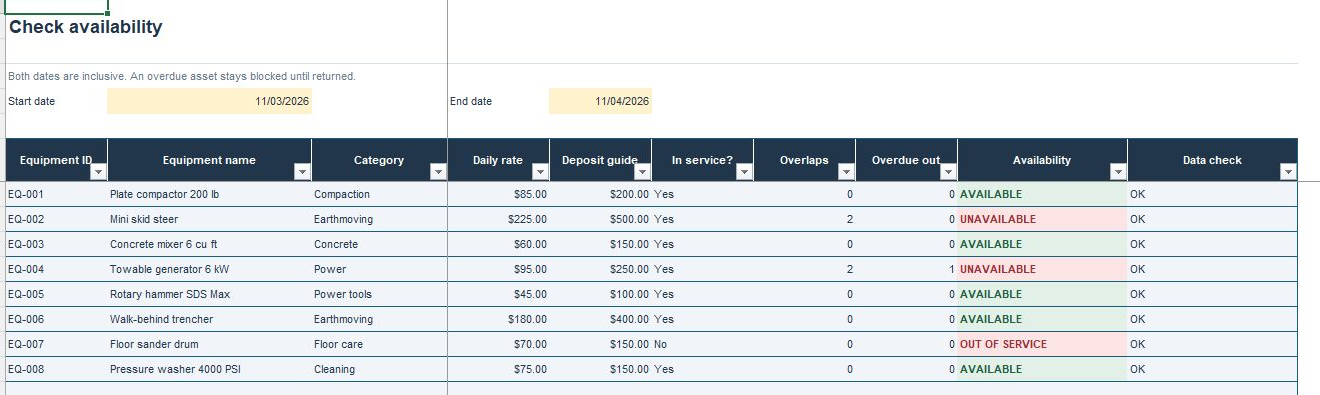
Check availability across an inclusive start/end date range and flag overlapping bookings.
Track Reserved, Out, Returned and Cancelled bookings, including overdue returns and missed pickups.
Calculate calendar-day rental charges, discounts, other charges, one entered tax rate and invoice totals.
Keep settled deposits, deposit refunds and noncash deposit applications separate from rental revenue.
Track partial payments, remaining invoice balances, customer credits and deposits to refund.
Review completed rental revenue, monthly income and actual cash movement in a Dashboard.
FROM FIRST ENTRY TO A CLEARER VIEW
Enter your individually numbered equipment and customer records. Each booking uses one physical asset ID and one customer ID.
Choose an inclusive start and due-date range in Availability. Review available, unavailable and out-of-service results before confirming a booking.
Create a booking with the agreed daily rate, tax rate and deposit requirement. Resolve overlap and entry warnings; the workbook does not lock online reservations.
Mark equipment Out at pickup and enter the actual return date when Returned. Overdue Out items remain unavailable until returned.
Record settled rental receipts, deposits, refunds and noncash deposit applications separately. Check customer credits and deposits still held.
Use Dashboard for unpaid balances, operational warnings, completed revenue by actual return date and actual cash movement.
ONE PURCHASE. YOUR OWN FILES.
Creem provides ZIP download access after successful payment and sends your receipt email.
Use the prepared input areas for your own records.
Blank.xlsxExplore fictional records and see how the workbook works.
Demo.xlsxAn English guide to setup, limits, and the checks to review.
User Guide.pdfBEFORE YOU BUY
Review the working environment and prepared limits. This is a workbook you operate yourself.
Ask a compatibility questionTested on Microsoft Excel desktop for Windows 16.0 build 20430. Microsoft Excel is sold separately. Mac, Excel for web, Google Sheets and LibreOffice were not individually verified. No VBA or external data connections. Use one editor at a time.
One numbered asset per booking. Calendar days with inclusive start and due dates; no same-day turnover.
100 assets, 200 customers, 300 bookings and 1,000 payment entries per workbook. Use prepared rows only.
Early return retains the scheduled minimum; an agreed credit is entered manually as a discount.
An overdue Out item blocks all future dates until returned. Warnings do not provide a real-time booking lock.
Cancelled means full cancellation before pickup, with charges zeroed. Cancellation fees and deposit forfeiture are not supported.
One manually entered tax rate applies to the entire net subtotal. Mixed tax treatment and tax lookup are not supported.
Completed revenue is grouped by actual return date, without daily accrual or cross-month proration.
No hourly or weekly tiers, meter usage, maintenance calendar, stock quantities, multi-asset orders, invoices, contracts, payment processing, accounting or tax filing.
Tested on Microsoft Excel desktop for Windows, version 16.0 build 20430. Mac, web Excel, Google Sheets and LibreOffice are not individually verified. Use one editor at a time.
Keep backups and review flagged entries. The license covers your own records or business; resale or redistribution is not permitted. Terms of Service · Refund Policy · Privacy Policy.
Yes. Both files are standard XLSX workbooks with formulas, tables, dropdowns and conditional formatting. There is no VBA or external data connection.
The workbook flags inclusive date overlaps for the same physical equipment ID. Review these warnings before confirming a rental. It does not provide a multiuser reservation lock.
No. Deposit receipts, refunds and applications are tracked separately. An application credits the invoice and reduces held deposits without creating new cash or extra revenue.
Both the start and due dates count. A same-day rental is one day. Early return keeps the scheduled minimum; late return adds calendar days at the booked rate. It does not calculate rolling 24-hour periods.
Yes. Enter the agreed daily rate, tax rate and deposit requirement for each booking. The entered tax rate applies to the full net subtotal; you determine the appropriate rate and treatment.
Microsoft Excel desktop for Windows version 16.0 build 20430 was tested. Other platforms and versions have not been individually verified. Microsoft Excel is sold separately.
Blank.xlsx, Demo.xlsx and a six-page English User Guide.pdf in one ZIP. The demo uses fictional data and a fixed review date.
No. This is a $19.90 USD one-time digital download for internal use within one business. Do not resell or redistribute the template.
EQUIPMENT RENTAL BOOKING & AVAILABILITY TRACKER
SL0003 v1.0 includes Blank.xlsx, Demo.xlsx and a six-page English User Guide.pdf. Download and extract the ZIP, then save a working copy of Blank.xlsx. Requires Microsoft Excel desktop for Windows, sold separately. No macros. Demo data is fictional.