For independent house cleaners and small residential cleaning teams
Know what to quote. See what each visit earned.
Connect service properties, cost-based quotes, scheduled visits and actual job results in six focused worksheets. Keep the agreed quote, direct costs and cumulative payments together without treating a prepayment as earned revenue.
INSIDE THE WORKBOOKACTUAL EXCEL · FICTIONAL DEMO
Cleaning business Excel template with a real sample monthly dashboard and cost-based quote workflow. All sample records are fictional.
Applicable taxes and final total are shown at checkout.
YOUR WORK, CONNECTED
A cleaning business spreadsheet from the first quote to the monthly review.
Built for independent residential cleaners and small teams using one editor at a time. Connect the property, agreed price and actual job results in Excel.
01
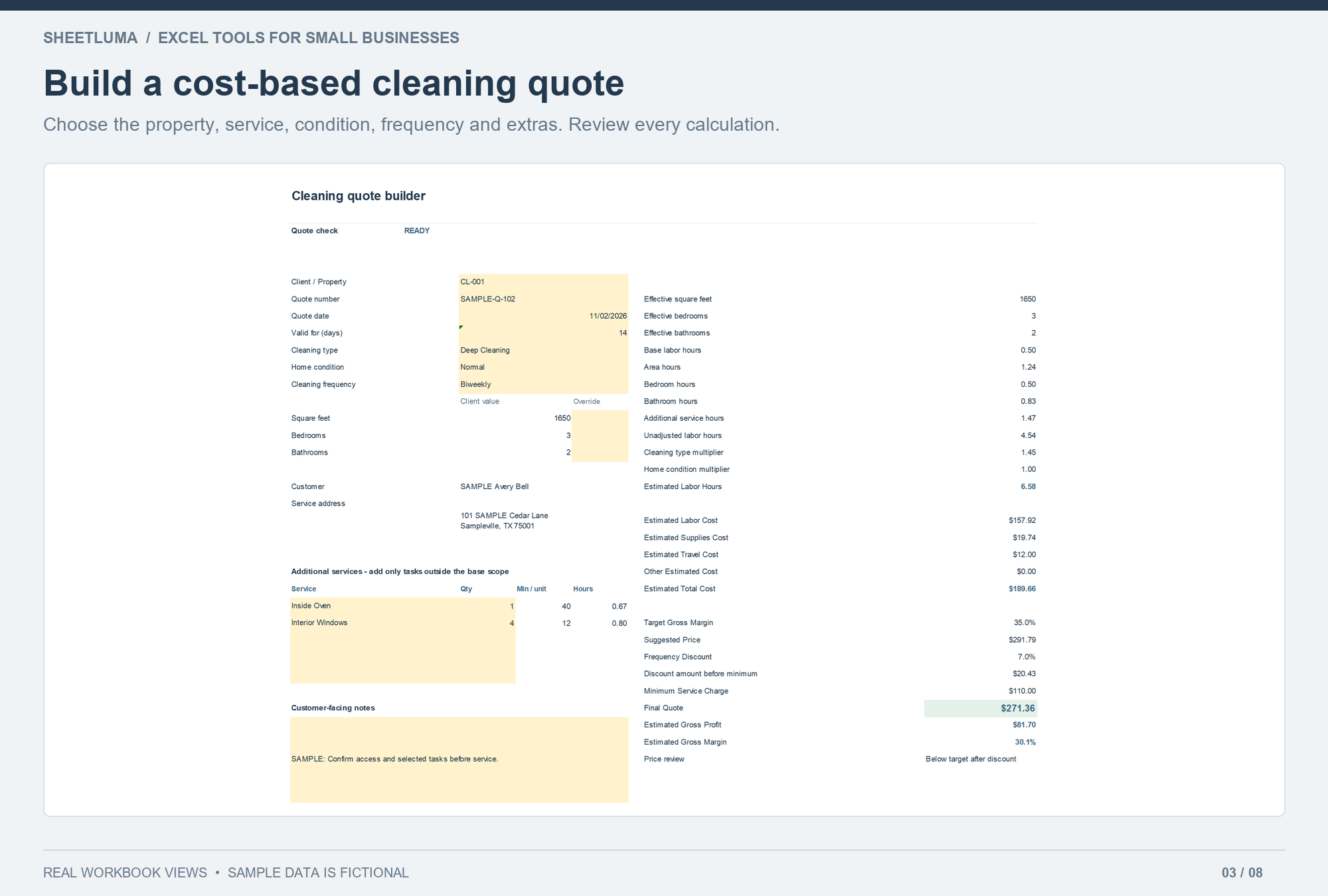
Cleaning quote calculator
Estimate total person-hours from square feet, bedrooms, bathrooms, cleaning type, home condition and selected extras. Apply your direct costs and target gross margin, then frequency discounts and a minimum charge. Default inputs are examples, not U.S. standard prices.
02
Clients and service properties
Link clients and service properties to quotes and visits with unique Client IDs.
03
Job Tracker
Save the agreed quote, service date, optional start time, frequency and status for each visit. After service, enter actual hours, direct costs and service revenue.
04
Suggested recurring dates
See date-based upcoming and overdue flags. Weekly, Biweekly, Every 4 Weeks and Monthly services suggest the next date; confirm and manually add each appointment yourself.
05
Actual job profit
Review gross profit, gross margin and revenue per labor hour using the actual revenue and direct costs you enter. Gross profit excludes unentered overhead, insurance and taxes; it is not net profit.
06
Payment balances and customer credits
Enter the cumulative net amount paid per job. See unpaid balances, partial payments and customer prepayments separately from earned service revenue; there is no payment-by-payment ledger.
07
Monthly business dashboard
Select a service month to review completed revenue, final direct costs, gross profit, outstanding balances and credits. Compare the annual revenue and gross-profit trend.
08
Customer-only cleaning quote
Print or export the dedicated one-page U.S. Letter quote area with service scope, selected extras, price, notes and validity dates. Internal costs and profit are excluded.
FROM FIRST ENTRY TO A CLEARER VIEW
A routine you can follow.
1
Set your costs and scope
Enter your business details and replace the illustrative labor, supplies, travel and pricing inputs in Rates & Settings.
2
Add one ID per service address
Enter each customer and property in Clients. Keep the ID stable and resolve flagged or duplicate records.
3
Build and export the quote
Choose the property, cleaning type, condition, frequency and extras. Review the calculation and save the customer-only quote as a PDF.
4
Save one confirmed visit per row
Create the job with its agreed date and status. Paste the agreed quote as a value into Job Tracker so later quotes cannot change the saved amount.
5
Record actuals and cumulative payments
Enter actual labor hours, direct costs and service revenue. Update the cumulative net amount paid; explicitly enter 0 where no cost applies.
6
Review the service month
Check gross profit, open balances and customer credits on Dashboard. Confirm suggested recurring dates and manually create the next visit.
ACTUAL WORKBOOK · FICTIONAL DEMO
Cleaning Quote Builder with property inputs, add-ons, estimated person-hours, costs, discount and final quote. All sample records are fictional.
ONE PURCHASE. YOUR OWN FILES.
Your own files, ready to open.
Creem provides ZIP download access after successful payment and sends your receipt email.
XLSX
Start with a clean workbook.
Use the prepared input areas for your own records.
Blank.xlsx
XLSX
Follow a complete example.
Explore fictional records and see how the workbook works.
Demo.xlsx
PDF
Get started step by step.
An English guide to setup, limits, and the checks to review.
User Guide.pdf
BEFORE YOU BUY
Make sure it fits your setup.
Review the working environment and prepared limits. This is a workbook you operate yourself.
Microsoft Excel desktop; sold separately. Formula design targets Excel 2019 and Microsoft 365.
Verified environment
Windows desktop Excel 16.0 build 20430. Excel 2019, Mac, browser Excel and other spreadsheet apps were not separately tested.
Prepared capacity
400 client/property rows and 600 visit rows. Expand native tables after unprotecting and verify copied formulas, formats and validation.
Files & collaboration
Blank.xlsx, Demo.xlsx and an eight-page English User Guide.pdf. No macros or external workbook links; one editor at a time.
Planning & reporting
Manually record each visit. Next-service dates are suggestions. Revenue and job gross profit use service dates; payments are cumulative per job.
License
Internal use within one business, including working and backup copies. No resale or redistribution. Your exported customer quotes may be shared.
Important capacity, manual steps & boundaries
Formula design targets Microsoft Excel 2019 and Microsoft 365. Tested on Windows desktop Excel 16.0 build 20430. Excel 2019, Mac, browser Excel, Google Sheets and LibreOffice were not individually verified. Microsoft Excel is sold separately. No VBA or external workbook links. Use one editor at a time.
Quote Builder is one reusable workspace. Save exported quotes separately and paste the agreed amount as a value into Job Tracker.
400 prepared property rows and 600 prepared visit rows. Native Excel table expansion is supported after unprotecting the sheet; verify the copied formula, validation and format.
Hours are total person-hours, not elapsed crew duration. Actual labor cost is entered manually; this is not payroll.
One cumulative net amount paid per job. No transaction ledger, payment processing or bank reconciliation.
Service revenue excludes sales tax and tips. No tax calculation or tax filing. Cancelled jobs have zero revenue; cancellation-fee income is outside this version.
Financial reporting uses service dates, not payment dates. Final Completed and Cancelled job costs are included; unentered overhead, insurance and taxes are not deducted.
Suggested recurring dates do not create appointments. No online booking, calendar sync, automated reminders, crew assignment or overlap checking.
Client details are live lookups; changing an address changes dependent views. Keep approved quote PDFs for a fixed record.
Formula design targets Excel 2019 and Microsoft 365. Tested on Windows desktop Excel 16.0 build 20430; Excel 2019, Mac, browser Excel and other spreadsheet apps were not separately tested. One editor at a time.
No online booking, employee schedule conflict checks or SMS notifications. No automatic invoicing, payroll or tax calculations.
Keep backups and review flagged entries. The license covers your own records or business; resale or redistribution is not permitted. Terms of Service · Refund Policy · Privacy Policy.
It estimates total person-hours from property measurements, service choices and add-ons. It applies your labor, supplies, travel and other costs, divides by one minus your target gross margin, then applies the frequency discount and minimum charge. All assumptions are editable and visible.
Are the default rates standard U.S. cleaning prices?
No. They are illustrative starting values. Replace them with your own time estimates, direct costs, service scope and pricing policy before quoting customers.
Does it automatically book recurring visits?
No. It suggests the next date for Weekly, Biweekly, Every 4 Weeks and Monthly visits. Confirm it with the customer and manually create the next job row.
What is the difference between Monthly and Every 4 Weeks?
Every 4 Weeks adds 28 days. Monthly advances by one calendar month with EDATE and adjusts for month-end dates.
Can I track partial payments?
Yes. Enter the cumulative net amount paid for each job. The workbook calculates the remaining balance and shows overpayments or prepayments as customer credits. It does not keep a payment-by-payment ledger.
Is gross profit the same as net profit?
No. Gross profit is service revenue minus the direct job costs you enter. Unentered overhead, insurance and taxes are not deducted.
Can I print a quote without showing my costs?
Yes. Quote Builder has a customer-only print area, P1:Y45, formatted for one U.S. Letter page. It includes scope, selected extras, price, notes and validity dates, without internal cost or profit figures.
Does it require macros or a subscription?
No. The files are pure XLSX workbooks. The product is a $19.90 USD one-time digital download. Microsoft Excel is separate software and is not included.
Which versions of Excel are supported?
The formula design targets Excel 2019 and Microsoft 365. Native testing used Windows desktop Microsoft Excel 16.0 build 20430. Excel 2019 and other platforms were not separately tested. Use desktop Excel and one editor at a time.
What files will I receive?
Blank.xlsx, Demo.xlsx and an eight-page English User Guide.pdf. The demo contains 10 fictional service properties and 27 sample visits.
SL0004 v1.0 includes Blank.xlsx, Demo.xlsx and an eight-page English User Guide.pdf. Download and extract the ZIP. Explore the fictional Demo, then save a working copy of Blank.xlsx and set your own costs. Requires Microsoft Excel, sold separately. No macros. One-business internal-use license.